Online surveys used to be painfully basic. A company would create a questionnaire, send it to customers or employees, collect a few hundred responses, export everything into a spreadsheet, and then spend hours trying to figure out what the answers actually meant.
That process has changed considerably.
Modern survey platforms are no longer just digital replacements for paper questionnaires. Businesses now use them to measure customer satisfaction, conduct market research, evaluate employee engagement, validate new products, collect event feedback, qualify leads, and understand why customers stay or leave.
SurveyMonkey has played a major role in that shift.
It is one of the most recognizable survey platforms on the market and is used by everyone from individual researchers and small businesses to universities, HR departments, marketing teams, and large enterprises.
But brand recognition alone does not make a survey platform worth paying for.
SurveyMonkey faces serious competition. Google Forms handles basic surveys for free. Typeform focuses heavily on attractive, conversational forms. Jotform offers extensive form-building capabilities. Qualtrics targets sophisticated enterprise research and experience management.
So where does SurveyMonkey fit?
SurveyMonkey’s main advantage is balance. It is easy enough for a beginner to create a survey without training, but it also offers advanced capabilities such as skip logic, branching, question piping, randomization, custom branding, integrations, statistical analysis, crosstabs, and enterprise administration.
That flexibility is valuable.
The catch is pricing.
SurveyMonkey’s free plan is fairly restrictive, and many of the features that make the platform genuinely useful for professional research require a paid subscription. Depending on your requirements, costs can rise quickly.
This SurveyMonkey review takes a detailed look at the platform from a practical business perspective. We will examine its survey builder, question types, templates, logic, AI tools, analytics, integrations, user experience, pricing, advantages, limitations, and major competitors.
More importantly, we will answer the question that actually matters:
Is SurveyMonkey worth paying for?
SurveyMonkey Review: Quick Overview
Before examining individual features, here is a quick look at what SurveyMonkey offers.
| Category | SurveyMonkey |
|---|---|
| Best For | Businesses, HR teams, marketers, researchers and organizations |
| Free Plan | Yes |
| Survey Templates | 500+ |
| Pre-Written Questions | 1,800+ |
| Survey Logic | Yes, capabilities depend on plan |
| AI Survey Creation | Yes |
| Custom Branding | Available on paid plans |
| Data Analysis | Built-in analytics and reporting |
| Crosstab Analysis | Available on higher plans |
| Statistical Significance | Available on eligible plans |
| Integrations | 200+ native integrations |
| Salesforce Integration | Available for eligible enterprise customers |
| Collaboration | Yes |
| Mobile-Friendly Surveys | Yes |
| Enterprise Options | Yes |
| Main Strength | Combination of ease of use and advanced survey features |
| Main Weakness | Many useful features require paid plans |
SurveyMonkey is therefore not simply a basic form builder.
Its strongest use case is structured feedback and research.
If you simply want to ask ten people what they want for lunch, SurveyMonkey may be unnecessary. If you want to understand why customer satisfaction dropped among a particular customer segment, it becomes much more useful.
What Is SurveyMonkey?
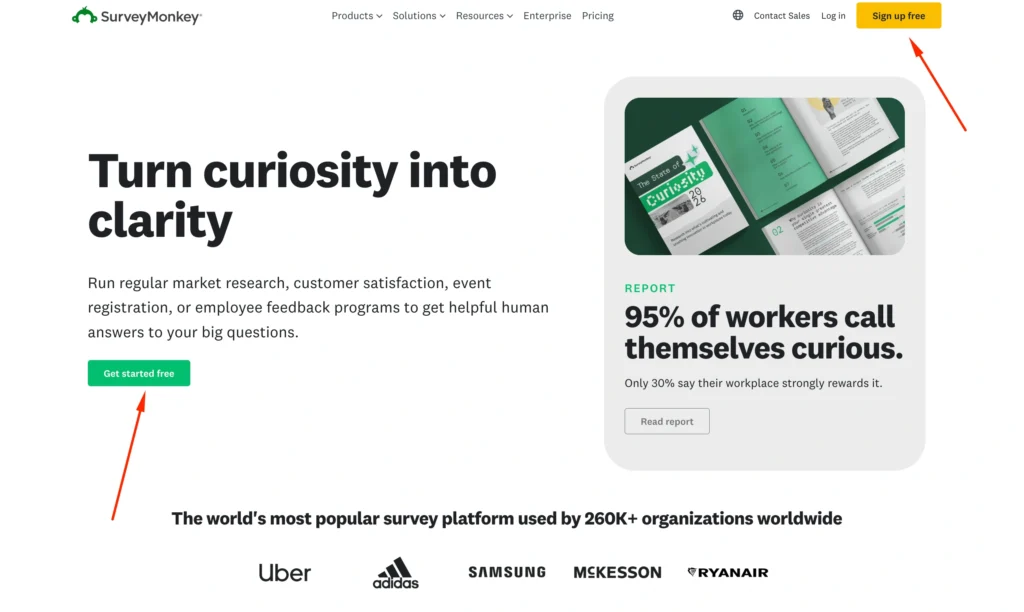
SurveyMonkey is an online platform for creating, distributing, collecting, and analyzing surveys.
The basic process is straightforward.
You create a questionnaire, select your questions, configure the design and logic, distribute the survey, collect responses, and analyze the results.
That sounds similar to almost every survey platform.
The difference appears when you start building more complicated research projects.
Suppose an HR department wants to conduct an employee engagement survey across 10 offices.
The company may need to:
- Ask different questions based on employee roles.
- Keep certain responses anonymous.
- Compare departments.
- Analyze satisfaction by location.
- Identify recurring themes in written comments.
- Export results.
- Share reports with management.
- Maintain consistent branding.
- Reuse standardized questions next quarter.
That is where professional survey software becomes more valuable than a basic online form.
SurveyMonkey attempts to cover both ends of the market.
A beginner can create a questionnaire in minutes.
A professional researcher can build considerably more complicated surveys using logic, randomization, piping, advanced analysis, and other tools.
SurveyMonkey Core Features: What Do You Actually Get?
SurveyMonkey has a long feature list, but not every feature matters equally.
The following capabilities have the biggest impact on day-to-day survey creation and research.
Survey Builder
The survey builder is the center of the platform.
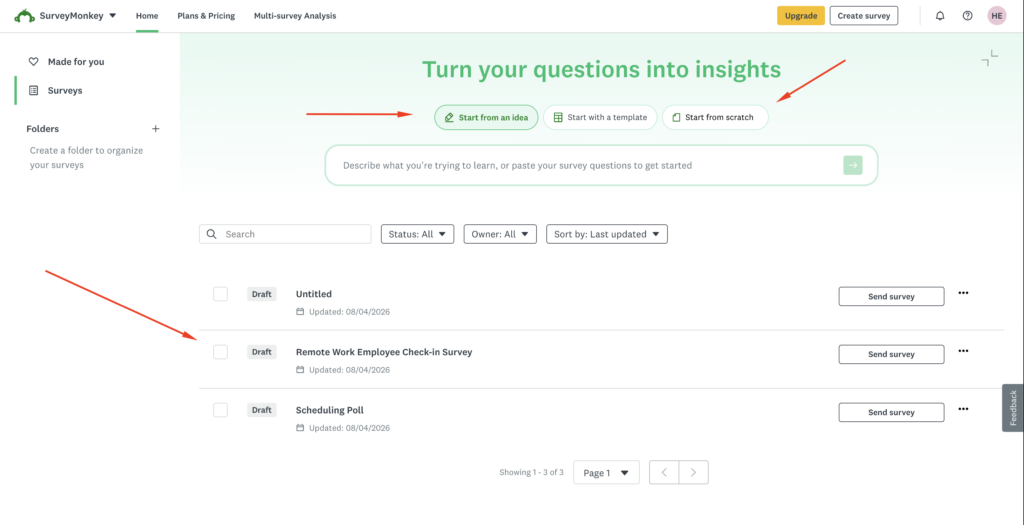
Users can start with a blank survey, use an existing template, copy a previous questionnaire, or use AI-assisted tools to speed up the creation process.
Questions can be added and rearranged without coding.
The interface supports common question formats such as:
| Question Type | Common Use |
|---|---|
| Multiple Choice | Customer preferences |
| Checkboxes | Selecting multiple options |
| Dropdown | Long lists of choices |
| Rating Scale | Satisfaction surveys |
| Matrix | Measuring multiple attributes |
| Text Box | Open-ended feedback |
| Ranking | Product or feature preferences |
| Demographic Questions | Audience segmentation |
| NPS-Style Questions | Customer loyalty measurement |
The variety matters because different research objectives require different question formats.
For example, asking customers:
“Are you satisfied?”
provides very little detail.
A rating scale asking customers to score satisfaction from 1 to 10 provides more useful information.
A follow-up open-ended question asking:
“What is the main reason for your score?”
adds qualitative context.
Good research usually combines multiple question formats.
SurveyMonkey makes that relatively easy.
SurveyMonkey Question Bank

One of SurveyMonkey’s most useful features for beginners is its Question Bank.
SurveyMonkey provides more than 1,800 pre-written questions that users can incorporate into surveys.
Why does this matter?
Because writing unbiased survey questions is harder than it looks.
Consider these two questions:
Question A:
“How much did you enjoy our excellent customer service?”
Question B:
“How satisfied or dissatisfied were you with our customer service?”
Question A is leading.
It assumes the service was excellent and subtly encourages the respondent to agree.
Question B is more neutral.
Professional researchers understand these differences, but a small business owner creating a first customer survey may not.
Pre-written questions can reduce some of those mistakes.
They are particularly helpful for common research areas such as:
- Customer satisfaction
- Employee engagement
- Product feedback
- Event feedback
- Market research
- Education
- Healthcare feedback
- Website feedback
Experienced researchers can still create completely custom questions.
Survey Templates
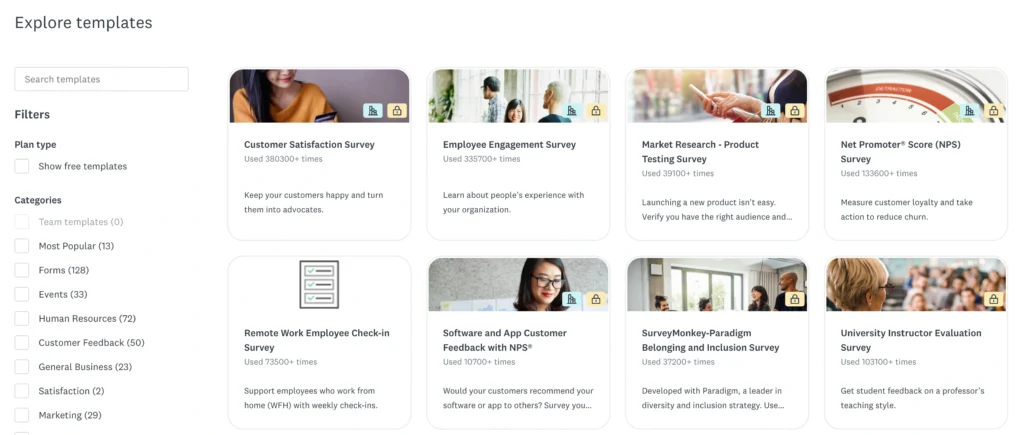
SurveyMonkey also offers more than 500 expert templates.
Templates are useful when you understand what you want to measure but do not know how to structure the questionnaire.
For example, an HR manager conducting an employee satisfaction survey could begin with an existing template instead of designing everything from scratch.
A marketing team researching a new product could do the same.
Templates can then be edited to match the organization’s requirements.
This saves considerable time.
However, templates should be treated as starting points rather than finished research projects.
Your customers, employees, market, and research goals are specific to your organization. A generic template rarely captures every important detail.
SurveyMonkey Logic: Building Smarter Surveys
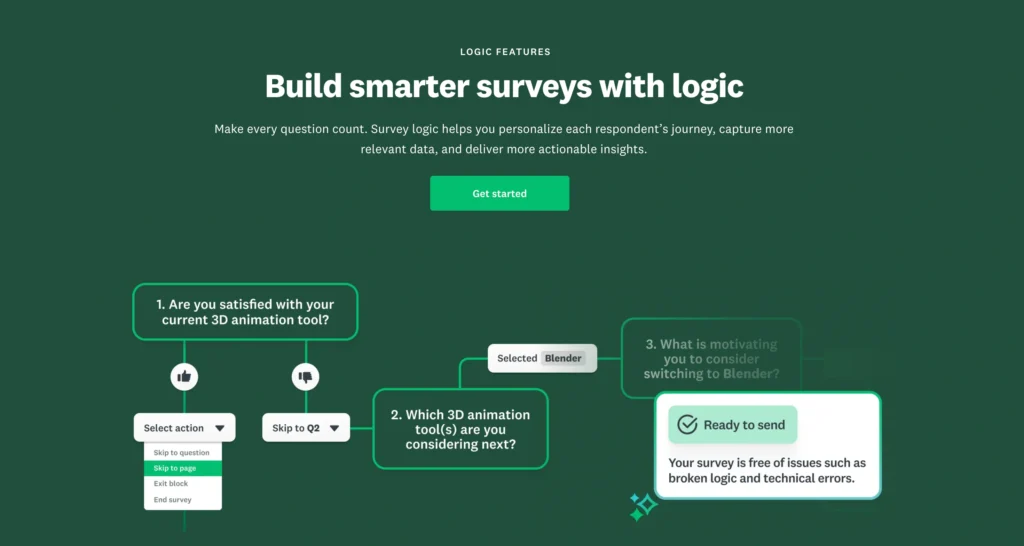
Survey logic is one of the biggest reasons to choose professional survey software over a basic form builder.
A well-designed survey should adapt to the respondent.
Skip Logic
Skip logic allows SurveyMonkey to send respondents to different questions or pages depending on their answers.
Imagine you run a travel company.
Your first question asks:
Have you booked an international flight during the past 12 months?
Respondents answering Yes might receive questions about airlines, booking websites, ticket prices, baggage policies, and satisfaction.
Respondents answering No should not receive those questions.
Instead, they could move directly to questions about future travel plans.
Without skip logic, respondents are forced to answer irrelevant questions.
That creates frustration and can reduce completion rates.
Advanced Branching
Advanced branching takes this concept further.
Multiple conditions can determine which questions or pages a respondent sees.
For example, a software company could create different paths for:
- Free users
- Paid customers
- Former customers
- Enterprise customers
- Trial users
Each group can receive questions relevant to its experience.
This makes surveys more personalized without requiring separate questionnaires for every audience.
Question and Answer Piping
Piping allows information from an earlier response to appear later in the survey.
Suppose someone selects Netflix as the streaming service they use most often.
A later question could automatically ask:
“What do you like most about Netflix?”
instead of displaying generic wording.
This small change makes questionnaires feel more natural.
Question Randomization
Question order can influence survey results.
If respondents always see Brand A before Brand B, ordering may introduce subtle bias.
Randomization helps researchers control for that.
This is particularly useful for:
- Product research
- Advertising testing
- Concept testing
- Brand studies
- Academic research
From a strategic standpoint, these features make SurveyMonkey substantially more useful for serious research than a simple questionnaire tool.
SurveyMonkey Custom Branding and Survey Design
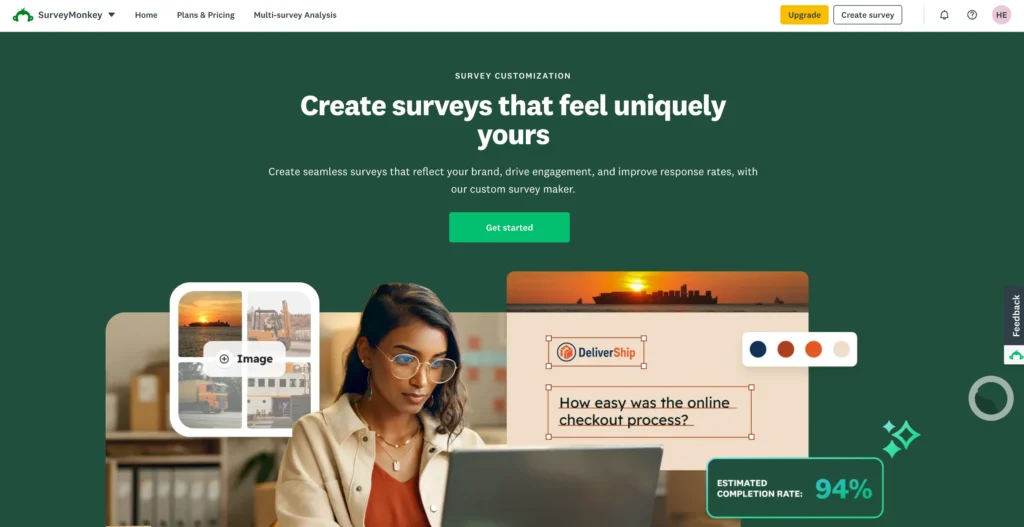
Surveys are part of the customer experience.
If a company spends heavily on branding but sends customers a generic-looking questionnaire, the disconnect can be noticeable.
SurveyMonkey provides customization options depending on the subscription level.
These may include:
- Company logos
- Custom colors
- Fonts
- Themes
- Survey layouts
- Custom URLs
- Completion redirects
- White-label options
Why Branding Matters
Consider two customer satisfaction surveys.
One uses generic colors and obvious third-party branding.
The other contains the company’s logo, fonts, colors, and consistent messaging.
The second generally feels more trustworthy and intentional.
Branding becomes particularly important for:
- Agencies
- Universities
- Enterprise organizations
- Customer research
- Premium brands
- Client-facing surveys
For internal surveys or informal questionnaires, extensive branding is less important.
One limitation is that the strongest branding controls are generally reserved for more expensive plans.
Users should therefore check exactly which customization features their selected plan includes.
SurveyMonkey Analytics and Reporting
Collecting responses is easy.
Understanding them is where survey platforms prove their value.
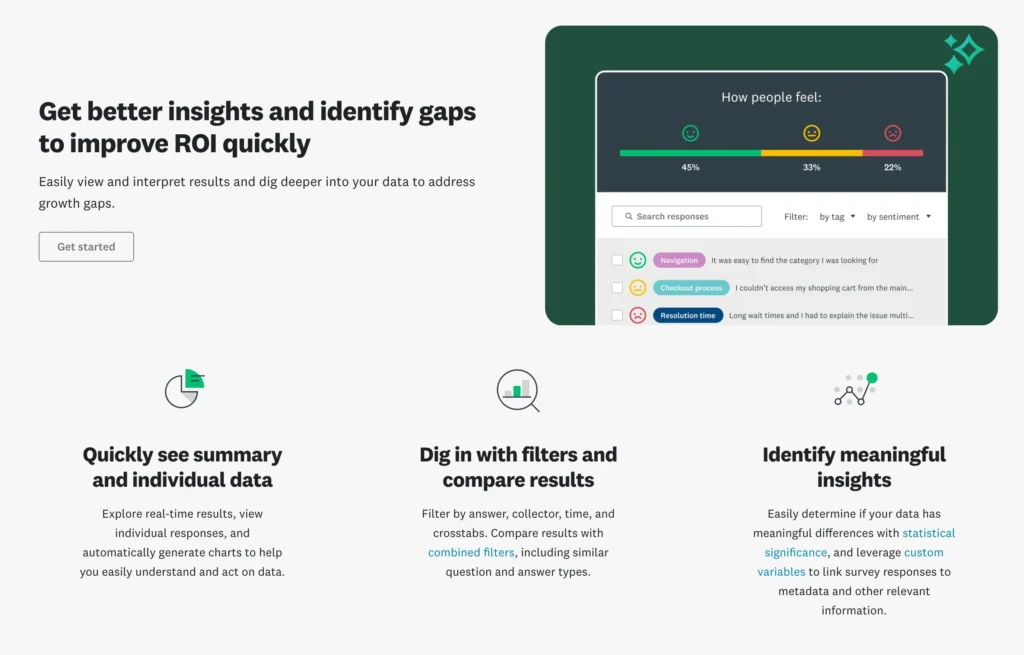
SurveyMonkey automatically turns responses into charts and summaries.
For small questionnaires, this may be enough.
For larger studies, deeper analytical capabilities become more important.
Filters and Segmentation
Filters allow researchers to isolate particular groups.
Imagine a retailer receives 4,000 customer responses.
Overall satisfaction is 82%.
That sounds positive.
But filtering might reveal:
| Customer Segment | Satisfaction |
|---|---|
| New Customers | 88% |
| Returning Customers | 85% |
| Premium Customers | 91% |
| Customers Who Contacted Support | 61% |
Now management has something actionable.
The real issue may not be the product.
It could be customer support.
Without segmentation, the 82% average hides that problem.
Crosstab Analysis
Crosstabs allow researchers to compare responses between groups.
For example, an HR department might compare employee satisfaction by:
- Department
- Seniority
- Location
- Employment duration
- Management level
This can uncover patterns that would otherwise remain hidden.
Statistical Significance
Some paid plans provide statistical significance capabilities.
This helps determine whether differences between groups are likely meaningful rather than simply random variation.
That is particularly useful in market research.
Suppose 64% of younger respondents prefer Product A while 59% of older respondents prefer Product A.
Is that difference meaningful?
You cannot determine that simply by looking at the percentages.
Sample size and statistical confidence matter.
Text and Sentiment Analysis
Open-ended responses can provide valuable insights, but analyzing them manually becomes difficult at scale.
Imagine receiving 8,000 written responses to:
“What could we do better?”
Reading each answer manually would take hours.
SurveyMonkey offers analysis capabilities that can help identify recurring themes and sentiment in written responses.
This allows organizations to spot repeated complaints or suggestions more quickly.
For instance:
“Delivery takes too long.”
“Shipping was delayed.”
“My package arrived a week late.”
These responses use different wording but describe essentially the same issue.
Grouping those themes makes qualitative data more useful.
SurveyMonkey User Experience: Is It Easy to Use?
Ease of use remains one of SurveyMonkey’s biggest strengths.
The platform manages to offer advanced capabilities without making basic survey creation unnecessarily complicated.
Experience for Beginners
A beginner can usually create a simple questionnaire without training.
The workflow is logical:
- Create the survey.
- Add questions.
- Customize the appearance.
- Configure settings.
- Choose how to collect responses.
- Send the survey.
- Review results.
Templates make the process even easier.
Someone who has never created a survey before could realistically build a simple customer feedback questionnaire within an hour.
Experience for Advanced Users
Professional users have much more to work with.
Once you introduce:
- Advanced branching
- Randomization
- Piping
- Multilingual surveys
- Custom variables
- Advanced analytics
- Integrations
- Team permissions
the learning curve naturally increases.
That is not necessarily a weakness.
Advanced research is complicated.
SurveyMonkey’s achievement is that beginners do not have to deal with all of this complexity unless they need it.
SurveyMonkey Pricing: Free vs. Paid Plans
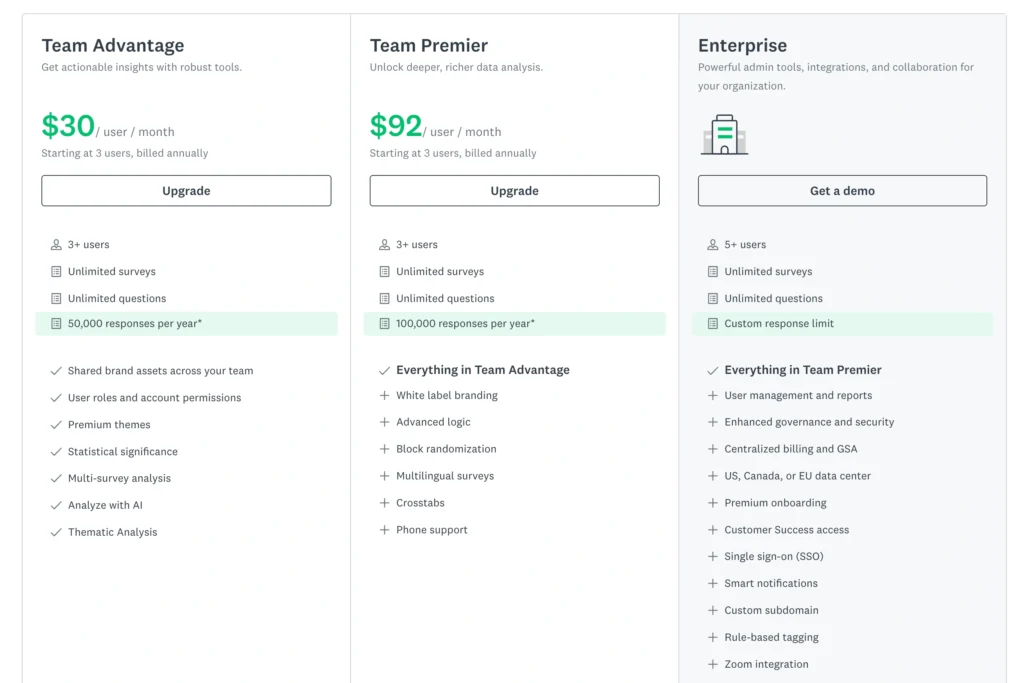
Pricing deserves careful attention because SurveyMonkey can become expensive.
Individual plan pricing commonly includes the following options, although exact prices, limits, and availability can change.
| Plan | Approximate Pricing | Best For |
|---|---|---|
| Basic | Free | Simple surveys and testing |
| Standard Monthly | $99/month | Short-term professional use |
| Advantage Annual | $46/month, billed annually | Regular individual users |
| Premier Annual | $139/month, billed annually | Advanced researchers |
| Team Plans | Starting around $30/user/month annually | Collaborative teams |
| Enterprise | Custom pricing | Large organizations |
SurveyMonkey Basic Free Plan
The free plan is useful for testing SurveyMonkey and running small questionnaires.
You can create surveys without paying.
However, restrictions apply to survey length, accessible responses, analysis capabilities, exports, and other functionality.
The 10-question-per-survey restriction is particularly significant.
Ten questions can be enough for a quick satisfaction poll.
It is rarely enough for serious market research.
SurveyMonkey Standard Monthly
The monthly plan makes more sense for users who need professional capabilities temporarily.
For example, a consultant conducting a single research project might prefer paying for a month rather than committing to an annual subscription.
The downside is cost.
At roughly $99 per month, SurveyMonkey becomes expensive if you keep the subscription active without using it regularly.
SurveyMonkey Advantage Annual
The Advantage plan is a more logical choice for individual users conducting surveys throughout the year.
It increases response allowances and unlocks considerably more functionality.
For regular researchers, marketers, consultants, and business owners, this is likely to provide a better balance between price and capabilities than the monthly plan.
SurveyMonkey Premier Annual
Premier moves further toward professional research.
It provides higher response limits and more sophisticated capabilities such as advanced logic, white-label branding, crosstabs, multilingual surveys, and other research tools.
The price is substantial.
This plan makes the most sense when survey data has genuine business value.
Is SurveyMonkey Good Value for Money?
SurveyMonkey’s value depends heavily on how you use surveys.
Consider two businesses.
Business A sends a five-question customer feedback form twice per year.
Business B continuously runs NPS surveys, employee engagement studies, cancellation surveys, customer research, product testing, and onboarding feedback.
Business A probably does not need a paid SurveyMonkey subscription.
Business B could easily justify one.
The question is not simply:
“Is SurveyMonkey expensive?”
A better question is:
“What decisions are we making with the information SurveyMonkey collects?”
If survey data helps improve retention, product development, employee satisfaction, or customer experience, the software can deliver significant value.
SurveyMonkey Integrations
Survey data becomes more useful when it connects with the rest of your business software.
SurveyMonkey supports a broad integration ecosystem.
Popular connections include:
| Integration | Potential Use |
|---|---|
| Salesforce | Connect customer feedback with CRM records |
| Slack | Share survey updates with teams |
| HubSpot | Connect feedback with marketing and CRM workflows |
| Microsoft Teams | Collaboration and notifications |
| Mailchimp | Audience and email workflows |
| Zapier | Connect SurveyMonkey with thousands of apps |
SurveyMonkey and Salesforce
Salesforce integration can be particularly useful for customer-facing organizations.
Imagine a support ticket is closed.
A customer satisfaction survey is automatically sent.
The customer’s response is then associated with the relevant customer information.
If the customer gives an extremely poor rating, the customer success team can take action.
Feedback becomes operational data rather than an isolated spreadsheet.
SurveyMonkey and Slack
Slack integration is useful for making survey results more visible.
Teams can incorporate feedback into existing workflows rather than repeatedly logging into a separate platform.
For example, important customer responses can be surfaced to the relevant department.
SurveyMonkey and HubSpot
Connecting SurveyMonkey with HubSpot can help marketing and customer teams combine survey information with contact data.
Suppose customers are asked:
“Which feature would you most like us to launch next?”
Their answers can potentially become useful segmentation information.
Marketing campaigns can then be tailored around customer interests.
Real-World SurveyMonkey Use Cases
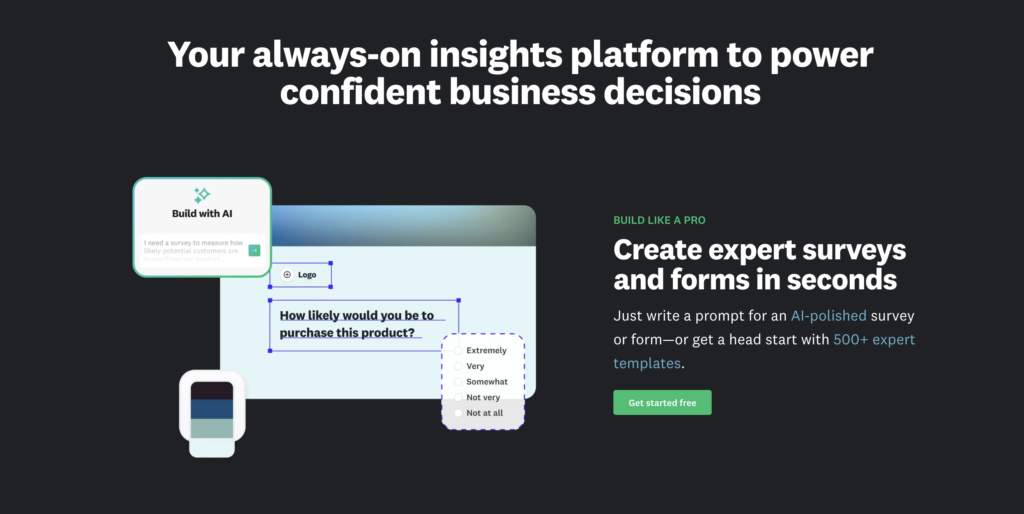
SurveyMonkey’s flexibility becomes easier to understand when looking at practical scenarios.
HR and Employee Feedback
HR teams can use SurveyMonkey for:
- Employee engagement surveys
- Manager feedback
- Training evaluations
- Exit interviews
- Workplace culture research
- Benefits surveys
An organization could run the same engagement survey every six months and track whether employee sentiment improves.
Customer Satisfaction
Businesses can measure:
- Overall satisfaction
- Customer service quality
- Purchase experience
- Product satisfaction
- Likelihood to recommend
- Reasons for dissatisfaction
This is one of SurveyMonkey’s strongest use cases.
Market Research
Marketing teams can research:
- Brand awareness
- Consumer preferences
- Pricing
- Product concepts
- Advertising ideas
- Purchase intentions
Logic and randomization become especially valuable here.
Product Development
Product teams can ask users which features matter most.
Instead of deciding based purely on internal opinions, companies can collect structured customer evidence.
Event Feedback
Organizations running conferences, webinars, workshops, or training programs can ask attendees about speakers, sessions, organization, content quality, and overall satisfaction.
SurveyMonkey Pros and Cons
No survey platform is perfect.
SurveyMonkey’s strengths are substantial, but so are some of its limitations.
SurveyMonkey Pros
- Easy for beginners: The basic survey creation process requires very little technical knowledge.
- Large template library: Hundreds of templates reduce the time required to create common surveys.
- Extensive Question Bank: Pre-written questions can help users avoid some common survey-design mistakes.
- Advanced logic capabilities: Branching, skip logic, piping, and randomization support more sophisticated research.
- Strong analytics: Filters, crosstabs, text analysis, and statistical tools make data easier to interpret.
- Good integration ecosystem: SurveyMonkey connects with major CRM, marketing, and collaboration platforms.
- Suitable for many departments: HR, marketing, customer experience, product, research, and education teams can all use the platform.
- Scalable: Organizations can move from basic questionnaires to more sophisticated research programs without immediately changing platforms.
SurveyMonkey Cons
- Paid plans are relatively expensive: Small businesses and occasional users may struggle to justify the cost.
- Free plan has significant restrictions: It works better for basic surveys and testing than serious research.
SurveyMonkey vs. Competitors
SurveyMonkey is not automatically the best choice for everyone.
Different competitors are stronger in different areas.
| Platform | Best For | Main Strength | Main Limitation |
|---|---|---|---|
| SurveyMonkey | Professional surveys | Balanced research feature set | Pricing |
| Google Forms | Simple free surveys | Free and easy | Limited advanced research tools |
| Typeform | Interactive surveys | User experience and design | Can become expensive |
| Jotform | Forms and workflows | Flexibility | Interface can feel feature-heavy |
| Qualtrics | Enterprise research | Sophisticated research capabilities | Expensive and complex |
SurveyMonkey vs. Google Forms
Google Forms wins on simplicity and cost.
For classroom questionnaires, internal polls, and basic feedback, it may be all you need.
SurveyMonkey wins when you require advanced logic, professional analytics, research templates, stronger survey controls, or business integrations.
SurveyMonkey vs. Typeform
Typeform puts greater emphasis on the respondent experience.
Its conversational presentation can work extremely well for lead generation, quizzes, and visually appealing questionnaires.
SurveyMonkey has a stronger traditional research orientation.
For serious market research or structured organizational feedback, SurveyMonkey will often be the more natural choice.
SurveyMonkey vs. Jotform
Jotform is broader than surveys.
It works particularly well for applications, registrations, payment forms, approvals, and business workflows.
SurveyMonkey is more focused on collecting and analyzing feedback.
Your choice therefore depends heavily on whether you primarily need forms or research.
SurveyMonkey vs. Qualtrics
Qualtrics operates much further into enterprise research and experience management.
Large organizations conducting highly sophisticated customer, employee, and market research may find Qualtrics more powerful.
However, that power comes with additional complexity.
SurveyMonkey is generally easier for non-research professionals to adopt.
Who Should Use SurveyMonkey?
SurveyMonkey is particularly suitable for:
- Marketing teams conducting customer and market research.
- HR departments measuring employee engagement and workplace sentiment.
- Customer experience teams collecting NPS and satisfaction data.
- Product managers validating features and gathering user feedback.
- Consultants conducting research for clients.
- Universities and researchers requiring structured questionnaires.
- Large organizations that need surveys across multiple departments.
The platform makes the most sense when surveys are conducted regularly rather than occasionally.
Who Should Avoid SurveyMonkey?
SurveyMonkey may not be the right choice if your requirements are extremely basic.
Someone creating a five-question poll every few months probably does not need an expensive subscription.
Likewise, businesses primarily looking for payment forms, order forms, or complex operational workflows may find platforms such as Jotform more appropriate.
Budget-conscious users should also compare alternatives carefully.
SurveyMonkey’s feature set is strong.
Its pricing means you should actually use those features.
Final Verdict: Is SurveyMonkey Worth It?
SurveyMonkey has survived in an increasingly competitive market for a reason.
It successfully sits between two extremes.
On one side are simple form builders that anyone can use but that quickly become limiting when research gets complicated.
On the other side are sophisticated enterprise research platforms that can be extremely powerful but require larger budgets, more expertise, and more implementation work.
SurveyMonkey occupies the middle remarkably well.
A beginner can create a customer satisfaction survey without understanding advanced research methodology.
At the same time, an experienced user can build questionnaires using branching, piping, randomization, segmentation, crosstabs, text analysis, statistical tools, integrations, and professional branding.
That flexibility is its biggest advantage.
The biggest drawback is equally clear: price.
The free plan is useful for testing the platform and conducting small surveys, but its limitations become noticeable quickly. Once you need professional analytics, advanced logic, branding, exports, higher response allowances, or sophisticated integrations, you will probably need a paid subscription.
For organizations that regularly use surveys to make business decisions, that investment can make sense.
An HR department tracking employee engagement every quarter is getting ongoing value.
A SaaS company measuring customer satisfaction and churn reasons is getting ongoing value.
A marketing department conducting consumer research before launching a new product is getting measurable value.
Conversely, an individual who sends one simple questionnaire every six months probably is not.
That distinction matters.
SurveyMonkey is best for businesses, researchers, HR teams, marketers, product teams, and organizations that treat feedback as useful business data rather than simply collecting answers.
It is easy to learn, deep enough for professional use, and backed by a mature ecosystem of templates, analytics, logic tools, and integrations.
It is not the cheapest survey platform available.
But if you actually need its research capabilities, SurveyMonkey remains one of the most complete and accessible choices in its category.